


To buy an ergonomic chair, start with fit and adjustability: match the seat height and depth to your body, choose a chair with lumbar support you can position, and confirm the armrests and headrest suit your desk and posture. Weight capacity, breathability, and recline also matter. The five products below cover chairs, a lumbar pillow, and a planning book, so you can compare tradeoffs before choosing.
Products Mentioned in This Guide
As an Amazon Associate, TheGearPool may earn from qualifying purchases.


Key takeaways
- Prioritize adjustable lumbar support, seat height, and seat depth over styling.
- Check the chair’s documented weight capacity and intended user height range.
- Mesh and foam affect breathability and pressure distribution; choose based on how long you sit.
- A lumbar pillow can add support to an existing chair, but it does not replace a chair with adjustable lumbar support.
- The Home Office Handbook is a downloadable educational resource, not a chair.
- Who this is for
- Selection criteria
- Quick comparison table
- Product-by-product tradeoffs
- How to choose
- FAQ
Who this is for
This guide is for home-office workers, students, gamers, and hybrid employees who sit for long stretches and want a chair that fits their body and workspace. It is also for anyone replacing a basic desk chair, adding lumbar support to an existing seat, or planning a pain-free home workspace. If you need a chair for a shared desk, a small room, or a heavier user, the tradeoffs below will help you narrow the field.
Selection criteria
Use these criteria to compare ergonomic chairs without relying on marketing claims.
- Adjustable lumbar support: Look for lumbar support that moves up/down or forward/back so it contacts your lower back, not just the mid-back. The Nexthro listing documents 1 inch forward/back and 3.15 inches up/down. The CASASIO listing documents a dual-direction adjustable lumbar cushion. The DUMOS listing documents up/down mesh lumbar adjustment.
- Seat width and depth: A seat that is too deep can press behind your knees; too narrow can feel restrictive. Documented seat dimensions matter. The Nexthro listing gives a 20.9-inch wide by 20.7-inch deep seat and says it suits users about 5 feet 4 inches to 6 feet 3 inches tall.
- Seat cushion: High-density foam is commonly used to resist sagging. The Nexthro listing cites a 3.2-inch thick high-density foam cushion. The CASASIO listing cites a virgin foam seat. The DUMOS listing cites a high-density sponge seat.
- Backrest and headrest: A high back can support the upper back; a headrest helps when you recline. The DUMOS listing documents an adjustable headrest with height and 42° angle adjustment. The Nexthro and CASASIO listings do not document a headrest.
- Armrests: Flip-up armrests are useful in small spaces because they let you tuck the chair under a desk. The DUMOS and CASASIO listings document flip-up armrests. The Nexthro listing does not document flip-up armrests.
- Weight capacity: Match the chair’s documented capacity to the user. The Nexthro listing says up to 400 lbs. The CASASIO listing says up to 330 lbs. The DUMOS listing says up to 300 lbs. The CloudBliss pillow listing says it supports users 100–200 lbs.
- Breathability: Mesh backs and breathable covers can help with airflow. The Nexthro, DUMOS, and CASASIO listings use mesh elements. The CloudBliss pillow has a breathable mesh cover.
- Recline and rock: A gentle recline or rocking mode can change pressure points during long sessions. The DUMOS listing documents a 120° rocking mode. The CASASIO listing documents tilt and rock with adjustable tension.
- Base and casters: A stable base and smooth casters matter for daily use. The Nexthro listing cites a heavy-duty base and smooth-rolling casters. The CASASIO listing cites a reinforced metal base and premium casters. The DUMOS listing cites multi-direction casters.
- Assembly: Check the assembly process and tools. The Nexthro listing estimates 15–20 minutes and provides instructions and a video. The CASASIO listing mentions clear instructions and included tools.
Quick comparison table
| Product | Type | Documented highlights | Best for |
|---|---|---|---|
| Nexthro Ergonomic Office Chair Desk Chair with Adjustable Lumbar Support | Chair | Adjustable lumbar (1 inch forward/back, 3.15 inches up/down); 20.9 inches wide x 20.7 inches deep seat; 3.2 inches high-density foam; 400 lbs; mesh; 15–20 min assembly | Heavier users or those who want strong lumbar adjustability and a wide seat; suitable per listing for about 5 feet 4 inches to 6 feet 3 inches |
| Home Office Handbook – Ergonomic Solutions For Back Pain: How To Establish A Comfortable, Pain-Free Home Workspace (Ergonomic Wellness Series 1) | Downloadable book | Educational resource; available for download now; no chair specs listed | Pre-purchase planning and workspace setup reading |
| DUMOS Executive Home Office Chair, Ergonomic Computer Desk Chair, Mesh | Chair | Adjustable headrest (height and 42° angle); up/down mesh lumbar; 120° rocking; flip-up armrests; 300 lbs; mesh back; multi-direction casters | Users who want a headrest, rocking motion, and space-saving armrests |
| CloudBliss Lumbar Support Pillow, Memory Foam for Office Chair, Black | Lumbar pillow | Memory foam; pear-shaped; supports users 100–200 lbs; double adjustable straps; anti-slip bottom; breathable mesh cover; 18.1 x 16.5 x 5.5 inches | Adding targeted lumbar support to an existing chair or car seat |
| Ergonomic Home Office Chair, 4-Way Lumbar, Thick Cushion, 330LBS (Gray/Silver) | Chair | 4-way lumbar; virgin foam seat; contoured mesh back; dual-direction adjustable lumbar cushion; flip-up armrests; tilt and rock; reinforced metal base; 330 lbs | Users who want 4-way lumbar adjustment, flip-up armrests, and a thick cushion |
Note: The table uses the exact product names and documented fields from the supplied product records. Verify current availability and price on Amazon before buying.
Product-by-product tradeoffs
Disclosure: TheGearPool is an Amazon affiliate. If you buy through links on this page, we may earn a commission at no extra cost to you. We only use the supplied product records and do not invent prices, ratings, or test results.
Nexthro Ergonomic Office Chair Desk Chair with Adjustable Lumbar Support
Nexthro Ergonomic Office Chair Desk Chair with Adjustable Lumbar Support is the highest documented weight capacity in this set at 400 lbs. Its lumbar support adjusts 1 inch forward and backward and 3.15 inches up and down, and the seat is 20.9 inches wide by 20.7 inches deep. The listing says it suits users roughly 5 feet 4 inches to 6 feet 3 inches tall and includes a 3.2-inch thick high-density foam cushion. Assembly is listed at 15–20 minutes. Tradeoff: the listing does not document a headrest or flip-up armrests, so if you need either, compare the DUMOS or CASASIO models.
Home Office Handbook – Ergonomic Solutions For Back Pain: How To Establish A Comfortable, Pain-Free Home Workspace (Ergonomic Wellness Series 1)
Home Office Handbook – Ergonomic Solutions For Back Pain: How To Establish A Comfortable, Pain-Free Home Workspace (Ergonomic Wellness Series 1) is not a chair. It is a downloadable book listed as available for download now. Use it if you want a structured planning resource before you buy a chair or set up a home workspace. Tradeoff: it provides no physical seating, adjustability, or weight capacity, so it cannot replace a chair. The supplied data does not include specific chair recommendations or dimensions for it.
DUMOS Executive Home Office Chair, Ergonomic Computer Desk Chair, Mesh
DUMOS Executive Home Office Chair, Ergonomic Computer Desk Chair, Mesh offers features the Nexthro listing does not document: an adjustable headrest with height and 42° angle adjustment, a 120° rocking mode, and flip-up armrests. Its mesh lumbar support adjusts up and down, and the chair has a breathable mesh back with a high-density sponge seat. The documented weight capacity is 300 lbs, which is lower than the Nexthro (400 lbs) and CASASIO (330 lbs) listings. Tradeoff: if you need a higher weight capacity or a more adjustable lumbar system, this may not be the best fit.
CloudBliss Lumbar Support Pillow, Memory Foam for Office Chair, Black
CloudBliss Lumbar Support Pillow, Memory Foam for Office Chair, Black is an accessory, not a full chair. It uses memory foam, has a pear-shaped ergonomic design, double adjustable straps, an anti-slip bottom, and a breathable mesh cover. The listing says it supports users 100–200 lbs and measures 18.1 x 16.5 x 5.5 inches. Tradeoff: it can add lumbar pressure relief to an existing chair, but it does not provide seat height, armrest, headrest, or recline adjustments. It also has a narrower documented user weight range than the chairs above.
Ergonomic Home Office Chair, 4-Way Lumbar, Thick Cushion, 330LBS (Gray/Silver)
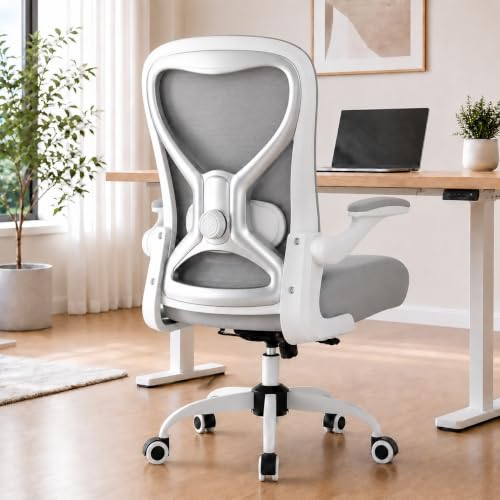
Ergonomic Home Office Chair, 4-Way Lumbar, Thick Cushion, 330LBS (Gray/Silver) combines a 4-way lumbar system, a dual-direction adjustable lumbar cushion, a contoured mesh back, and a virgin foam seat. It has flip-up armrests, tilt and rock with adjustable tension, a reinforced metal base, and premium casters. The documented weight capacity is 330 lbs. Tradeoff: the listing does not document a headrest, and its weight capacity is lower than the Nexthro listing. If you want a headrest, the DUMOS listing documents one.
How to choose an ergonomic chair
Use this step-by-step approach to narrow the options.
- Measure your desk and room. Check the desk height, available floor space, and whether you need to tuck the chair under the desk. Flip-up armrests, documented on the DUMOS and CASASIO listings, can help in tight spaces.
- Match the chair to your body. Compare your height and weight to the documented specs. The Nexthro listing gives a seat size and an intended height range of about 5 feet 4 inches to 6 feet 3 inches and a 400 lb capacity. The DUMOS listing is 300 lbs, and the CASASIO listing is 330 lbs. The CloudBliss pillow listing supports 100–200 lbs.
- Decide how much lumbar adjustment you need. Basic up/down lumbar is documented on the DUMOS. More granular adjustment is documented on the Nexthro (forward/back and up/down) and the CASASIO (4-way and dual-direction). If you have existing back discomfort, more adjustability gives you more ways to tune contact.
- Choose headrest and armrest features. If you recline or want neck support, the DUMOS listing documents an adjustable headrest. If you need to save space, flip-up armrests are documented on the DUMOS and CASASIO. The Nexthro listing does not document either feature.
- Pick your material for comfort. Mesh is common in the Nexthro, DUMOS, and CASASIO listings for breathability. Foam seats vary: Nexthro cites 3.2 inch high-density foam, DUMOS cites high-density sponge, and CASASIO cites virgin foam. If you sit for long periods, consider which combination of airflow and cushioning you prefer.
- Consider a lumbar pillow as an add-on. The CloudBliss pillow can add support to an existing chair, car seat, or gaming seat. It is not a substitute for a chair with adjustable lumbar support, but it can be a lower-commitment upgrade.
- Plan for assembly and setup. The Nexthro listing estimates 15–20 minutes and provides instructions and a video. The CASASIO listing mentions clear instructions and included tools. Read the assembly details before buying if you want a quick setup.
- Verify current price and availability. The supplied data does not include prices. Check the Amazon listing for the current price, shipping, and return policy before you buy.
| Your priority | Feature to prioritize | Product to compare |
|---|---|---|
| Highest documented weight capacity | 400 lbs capacity | Nexthro Ergonomic Office Chair Desk Chair with Adjustable Lumbar Support |
| Headrest and rocking | Adjustable headrest; 120° rocking | DUMOS Executive Home Office Chair, Ergonomic Computer Desk Chair, Mesh |
| 4-way lumbar and thick cushion | 4-way lumbar; virgin foam seat | Ergonomic Home Office Chair, 4-Way Lumbar, Thick Cushion, 330LBS (Gray/Silver) |
| Lower-cost way to add lumbar support | Memory foam pillow with straps | CloudBliss Lumbar Support Pillow, Memory Foam for Office Chair, Black |
| Pre-purchase planning | Educational book | Home Office Handbook – Ergonomic Solutions For Back Pain: How To Establish A Comfortable, Pain-Free Home Workspace (Ergonomic Wellness Series 1) |
FAQ
What should I look for first when buying an ergonomic chair?
Start with fit: adjustable lumbar support, seat height, and seat depth. Then check armrests, headrest, weight capacity, and materials. The supplied listings show that lumbar adjustment ranges from basic up/down on the DUMOS to forward/back and up/down on the Nexthro and 4-way dual-direction on the CASASIO.
Is a lumbar support pillow enough for back pain?
It depends on your chair and needs. The CloudBliss Lumbar Support Pillow is documented as a memory foam pillow with straps and a breathable mesh cover, supporting users 100–200 lbs. It can add lumbar support to an existing chair, but it does not add seat height, armrest, headrest, or recline adjustments. If your chair lacks those features, a full ergonomic chair may be a better fit.
How do I choose the right weight capacity?
Compare your weight to the documented capacity. The Nexthro listing says up to 400 lbs. The CASASIO listing says up to 330 lbs. The DUMOS listing says up to 300 lbs. The CloudBliss pillow listing says 100–200 lbs. Choosing a chair with capacity above your weight is a practical safety margin.
Do I need a headrest?
A headrest can help when you recline or want neck support. The DUMOS listing documents an adjustable headrest with height and 42° angle adjustment. The Nexthro and CASASIO listings do not document a headrest. If you mostly sit upright and do not recline, a headrest may be less important.
Are mesh chairs good for long sitting sessions?
Mesh can improve airflow, which many people prefer for long sessions. The Nexthro, DUMOS, and CASASIO listings document mesh elements. Foam seats also matter: Nexthro cites 3.2 inch high-density foam, DUMOS cites high-density sponge, and CASASIO cites virgin foam. The best choice depends on whether you prefer a cooler mesh back or a thicker foam seat.
What if I need a chair for a small home office?
Look for flip-up armrests so you can tuck the chair under the desk. The DUMOS and CASASIO listings document flip-up armrests. The Nexthro listing does not. Also check the documented seat dimensions and the chair’s overall footprint before buying.
Where can I learn more before buying?
The Home Office Handbook – Ergonomic Solutions For Back Pain: How To Establish A Comfortable, Pain-Free Home Workspace (Ergonomic Wellness Series 1) is a downloadable book listed as available for download now. It is an educational resource, not a chair, and the supplied data does not list specific chair specs for it.